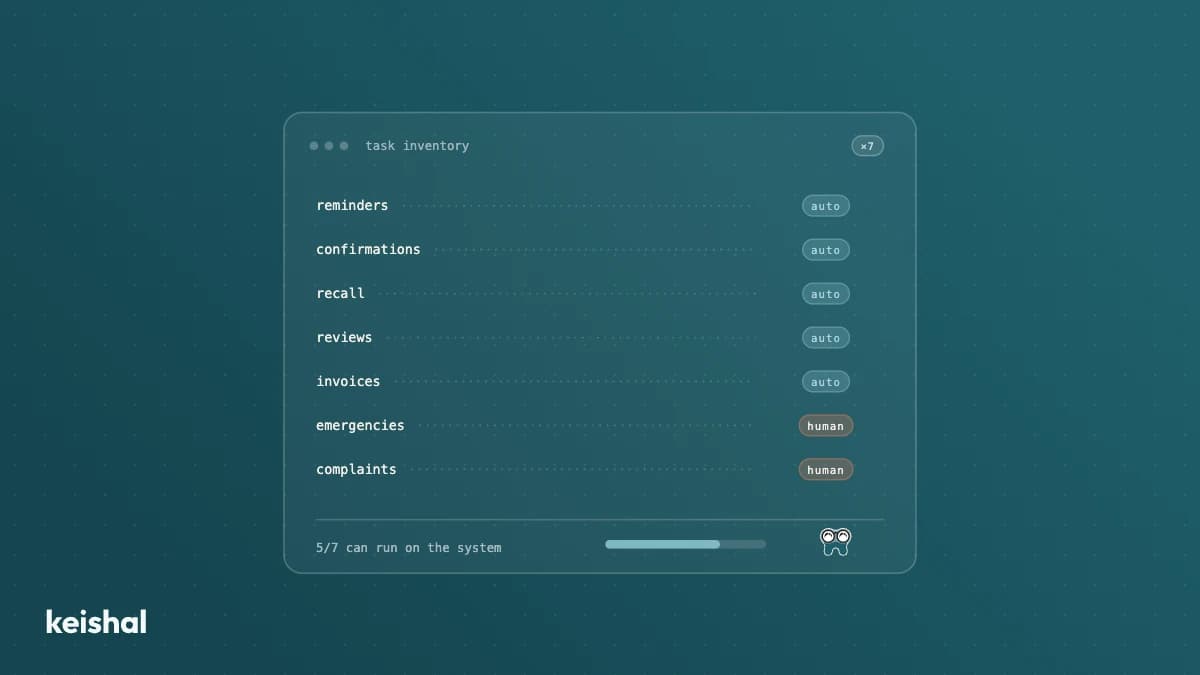
Of a dental clinic's administrative tasks, the repeatable ones with clear rules (reminders, recall, reactivation, appointment booking, out-of-hours questions, reviews and consents) can be automated. The ones requiring clinical judgement or emotional handling cannot. This guide walks through them one by one, with a rollout order by return: reminders first, then recall and reactivation.
A front desk making 40 confirmation calls of 3 minutes a day spends 2 hours daily just confirming appointments. Over ten working days that is 20 hours: half a weekly shift of one person, spent on work that needs no judgement, only consistency. Dental clinic automation starts there: separating which administrative tasks are repeatable and which ones genuinely need a person.
This guide walks through those tasks one by one. For each: whether it can be automated, what the clinic gains, and where the limit sits. At the end, the order to roll it out by return, because not every task pays back the same.
The criterion: rules you can write down, yes; judgement, no
The useful split is not technology versus no technology. It is this: which tasks follow rules you could write on paper, and which ones require judgement. Confirming an appointment follows a rule (appointment tomorrow, message today). Explaining a treatment to a nervous patient does not.
Everything clinical stays out of this guide. Diagnoses, treatments and any conversation about health belong to the dentist and their team. Here we cover only the administrative layer, the one we develop in how to apply artificial intelligence at your dental clinic.
Within that layer, the test is simple. If you can explain the task to a new hire in five minutes and they would do it the same on Monday as on Friday, it can be automated. If every case calls for a different decision, it cannot.
The administrative tasks, one by one
Appointment reminders and confirmations
This is the most repeatable task of all: every appointment tomorrow needs a message today. Automating it does not just mean sending. It means handling the reply, so the patient can confirm, reschedule or cancel with one tap from the same message.
The arithmetic is the one above: 40 calls times 3 minutes is 2 hours a day. A system does the same in seconds and records every reply in the agenda. And when the cancellation happens anyway, an automatic waiting list can refill the slot in minutes, as we explain in how to reduce no-shows at your dental clinic.
Automatable: yes, end to end. The limit: a patient who replies with a clinical question must end up with a person, with the context of the conversation.
Periodic recall
Recall, the periodic check-up that keeps a patient active, is the task that gets postponed the most because it is never urgent. The rule exists: patient overdue for a check-up, contact them. But it depends on someone pulling the list every week and working through it between calls.
Automated, recall stops depending on the front desk's spare moments. The system detects who is due, reaches out, handles the reply and books the check-up. The full discipline is in what is dental recall and how to automate it.
Automatable: yes, and it is one of the first worth doing. The limit: the check-up frequency is set by the dentist's clinical criteria, not by the system.
Reactivating dormant patients
This is the task that never fits. Count your patients with no visit in the last 12 months (in many clinics that is hundreds) and multiply by 5 minutes per call: 1,000 patients times 5 minutes is about 83 hours, more than two weeks of full-time work. That is why the usual conclusion in clinics is not "reactivation doesn't work" but "reactivation doesn't fit".
Automated, it becomes hundreds of personalised WhatsApp conversations at once, with every reply enriching the patient's record. The step by step is in how to reactivate inactive patients at your dental clinic.
Automatable: yes, and it is usually the highest-return task if you have a dormant database. The limit: not everyone will come back even if you contact them. Some have moved, others no longer need it. The system recovers the recoverable, not everyone.
Booking and rescheduling
Booking can be automated, with one important nuance. The patient sorts out their questions over WhatsApp (opening hours, insurance, treatments) and, when they want an appointment, receives a calendar link where they pick the slot themselves. The confirmed appointment is written into your agenda.
That nuance removes the obvious objection: "what if the AI books the wrong time?". Nobody guesses the time; the patient picks it in the calendar. We develop it in 24/7 online appointment booking for your dental clinic.
Automatable: yes, with the patient picking the slot in a calendar. The limit: complex cases, such as long treatment plans or urgencies with pain, are routed to the front desk.
Out-of-hours questions
A clinic open 50 hours a week covers 50 of the week's 168 hours. During the other 118, 70% of the time, nobody answers. And the patient asking at 9:30pm whether you take their insurance is often writing to another clinic too.
Questions with a known answer approved by the clinic can be automated. Anything outside that perimeter escalates to a person with the full context of the conversation. We develop it in how to answer patient questions 24/7 at your dental clinic. And if what you're considering for this task is a chatbot, we evaluate that category in chatbots for dental clinics: what they solve and where they fall short.
Automatable: frequent questions, with answers the clinic defines. The limit: clinical doubts and complaints always go to your team.
Reviews after the visit
The review request works when it arrives right after the visit, while satisfaction is fresh. That moment is a rule, not a judgement call, so it can be automated: visit completed, message with the link.
What cannot be automated is the experience that earns the review. The system asks; the visit convinces. The full mechanics are in how to get Google reviews for your dental clinic.
Automatable: the request and its follow-up. The limit: you ask every patient, without filtering before asking.
Consents and paperwork
Sending the consent form before the visit and archiving the signed copy can be digital. No more lost papers or rushed signatures at the counter. Explaining the treatment to the patient, however, is not automatable: signing without understanding protects nobody.
Data matters here. Any patient communication means handling sensitive data, whatever the channel. Doing it with guarantees, through an official channel and with clear consents, is a signal of seriousness the patient notices, and it strengthens trust. How WhatsApp fits into this is covered in WhatsApp for dental clinics: uses and data protection.
Automatable: the document's journey. The limit: the conversation that gives the signature meaning.
What you should not automate
The list is short but non-negotiable:
- Clinical conversations. Diagnosis, pain, treatment options. A system can detect them and hand them to the team with full context, never resolve them on its own.
- Complaints. An upset patient needs to feel heard by a person. An automated reply to a complaint makes it worse.
- The in-person relationship. The receptionist who greets by name, the dentist who remembers last visit's conversation. It is the reason the patient comes back, and it cannot be delegated.
That is why a well-designed system does not try to cover everything. It defines what escalates to a person and escalates it with the whole conversation, so your team never starts from zero. Automation removes the repetitive load precisely so the front desk has time for these three things.
Where to start: the order by return
Not every task pays back the same. A sensible order:
- Reminders and confirmations. Immediate, visible return: fewer empty chairs this very week, and the 2 daily hours of calls disappear.
- Recall. Stabilises next month's agenda and keeps the base active. Every check-up booked today is a patient you will not need to reactivate in 2027.
- Reactivation. The largest volume of pending revenue usually sits here. Run your own numbers: dormant patients times your average treatment value. But it needs a reasonably clean database, which is why it does not go first.
- Booking and 24/7 questions. Turns demand currently lost out of hours into first visits.
- Reviews and consents. Less urgent, but cheap to add once the rest is working.
If you can only do one thing this quarter, do the first one. It is the one you notice soonest and the one that depends least on the state of your data.
Who operates all this (and what your team does)
The uncomfortable question remains: who configures, watches and adjusts all these automations? The market's usual answer is "your team, with our software". And that is where many automations die, because the front desk is already busy. It is a pattern we hear repeatedly in calls with clinics (real quote, anonymised, translated from Spanish):
"I'd rather call patient by patient personally than have to learn to use yet another new thing." (Family clinic, Valencian Community, Spain)
The alternative is an autonomous system: a platform that operates for you on top of the practice management software you already use (Gesden, Nubimed, Dentalink, Clinic Cloud and others), with no migration and nothing new for your team to learn. The system does the work, writes the results into your agenda and your PMS, and escalates to people what needs people.
In 2026 the question is no longer whether these tasks can be automated. It is which part of your week you want back first. If you want to see it with your clinic's data, book a demo: we go through your case task by task, with your numbers.
Ready to try Keishal in your dental clinic?
Book a demo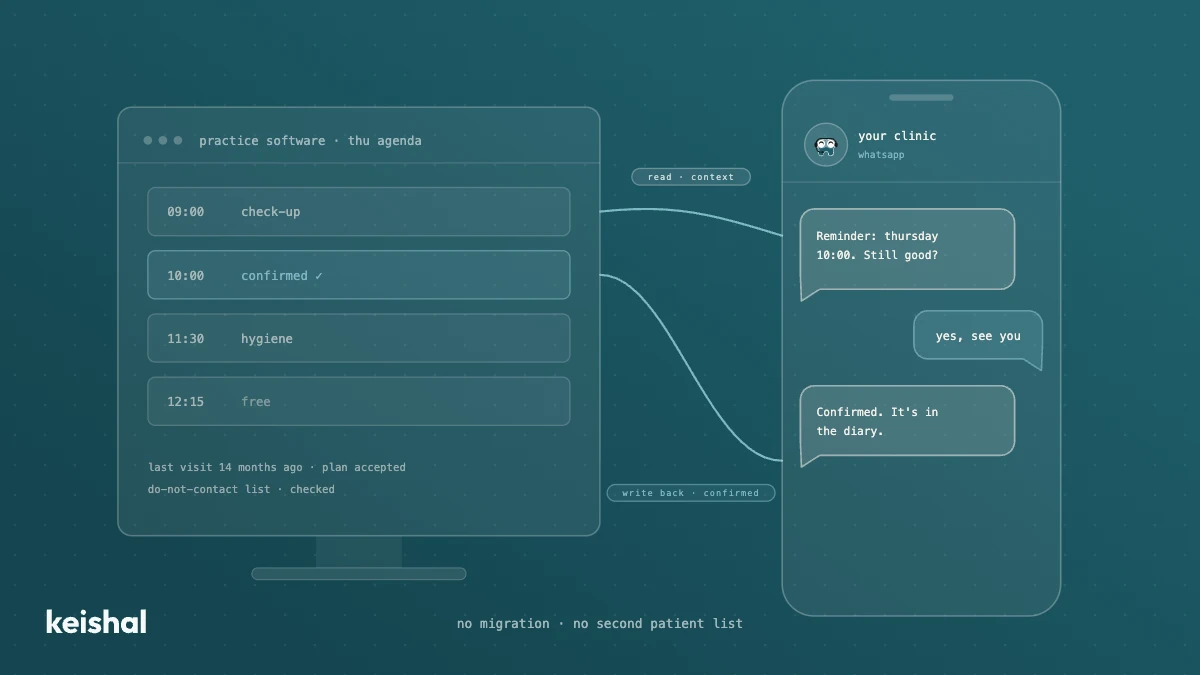
Integrating AI with your dental practice software: what a real connection means
A real integration with your dental clinic's software does two jobs: it reads your patients' data for context and writes appointments, confirmations and status changes back into your program. A monthly CSV, a calendar connector or a read-only tool leaves the rest to your team: with 330 reminders a month, marking each confirmation at 30 seconds adds up to almost 3 hours. Ask for the list of supported programs and versions in writing, and check that there's no migration and no duplicate patient base.
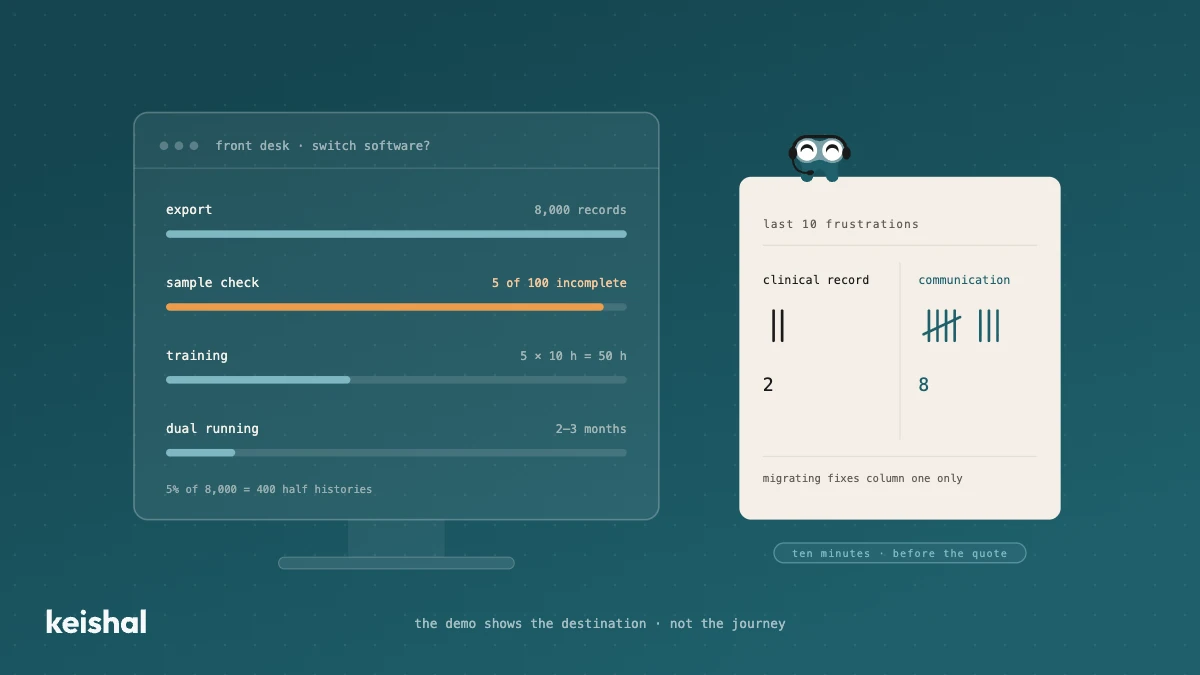
Switching dental software: what migrating really involves and when you don't need to
Switching dental software isn't installing a program: it's exporting and verifying thousands of records, training the team (5 people × 10 hours = 50 hours) and running two systems side by side for two or three months. It's worth it when the software has no support, holds your data hostage or the clinic has outgrown it. But if what's pushing you is unmanaged reminders, recall that never happens and out-of-hours messages, that communication layer can be added on top of your current PMS, without migrating anything.