
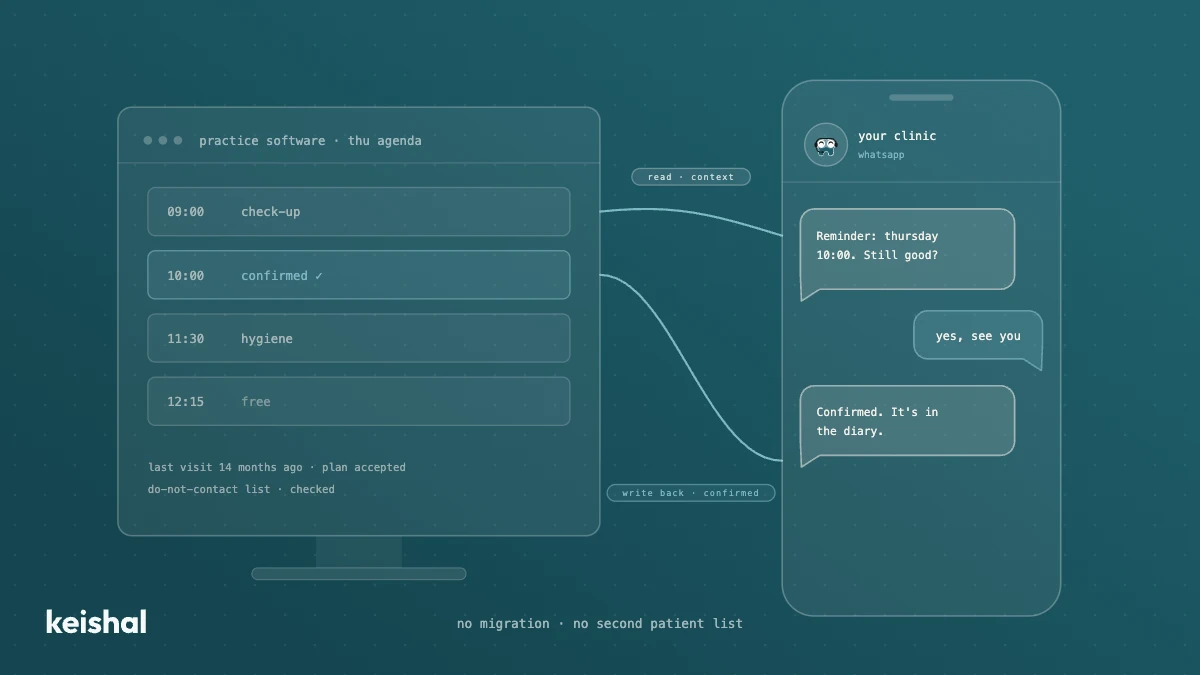
A real integration with your dental clinic's software does two jobs: it reads your patients' data for context and writes appointments, confirmations and status changes back into your program. A monthly CSV, a calendar connector or a read-only tool leaves the rest to your team: with 330 reminders a month, marking each confirmation at 30 seconds adds up to almost 3 hours. Ask for the list of supported programs and versions in writing, and check that there's no migration and no duplicate patient base.
Many AI vendors for dental clinics say they "integrate with your practice management software". The phrase can mean four very different things, and the difference is paid for in front-desk hours. A real integration with your dental clinic's software does two jobs: it reads your data for context, and it writes the outcomes (appointments, confirmations, status changes) back into the program you already use. If it only does one, someone on your team does the other by hand: with 15 appointments a day that's 330 reminders a month, and their replies either reach your schedule on their own or get typed in one by one. This guide explains how to tell the levels apart, what to ask before signing, and when you don't need to migrate anything.
What it means for AI to integrate with your dental practice software
Your practice management system (Gesden, Nubimed, Dentalink or whichever you use) is the clinic's system of record: the schedule, the patient records, the treatments, the quotes. Any tool that talks to your patients needs two things from it.
The first is reading. To write to a patient in a way that makes sense, the tool has to know who they are and when they last came in. It also needs to know whether they have an appointment next week or a treatment left halfway. Without that read, the message is generic, and sometimes it's simply wrong.
The second is writing back. When the patient confirms, cancels or books, that outcome has to end up in your schedule. If it doesn't get there on its own, someone types it in.
Those two directions give you four levels of "integration", and it's worth knowing which one each proposal sits at:
| Level | What it does | What's left for your team |
|---|---|---|
| No connection | The tool works from a list you give it | Preparing the list and entering every outcome by hand |
| Periodic export (CSV) | It receives a data dump every so often | Running the export and entering every outcome by hand |
| Read only | It reads the program for context | Entering every outcome by hand |
| Read and write | It reads for context and writes appointments and statuses | Reviewing what needs a person |
Only the last level removes work in both directions. The other three can be useful, but they aren't the same thing, and a sales proposal doesn't always make that clear.
The integrations that stop halfway
The monthly CSV
Exporting your patient base to a file and uploading it to another tool looks like an integration, but it's a snapshot. If you export on the 1st, by the 25th the tool is working with 24 days of changes it doesn't know about: patients who have already booked, who cancelled, or who asked not to be contacted again. The typical result is a recall message to someone who has an appointment on Thursday. To the patient, the clinic doesn't know who they are.
The generic connector
Some tools connect through a shared calendar or a general-purpose connector. They see free and booked slots, but not the patient record: they don't know whether the patient has a pending treatment or when they last came in. They work for booking; they don't work for deciding who to write to or what to say.
Reading without writing
This is the hardest case to spot in a demo, because the tool seems to know your patients. But every outcome comes back to your team as a task. Run the numbers on a normal schedule: 15 appointments a day × 22 days = 330 reminders a month. If 1 in 10 replies, that's 33 conversations that change something in the schedule. And every confirmation, even one that triggers no conversation, has to be marked: if it takes you 30 seconds, 330 × 30 s = 165 minutes, almost 3 hours a month typing in what the tool already knew. It's exactly the double handling an integration should remove.
Reading for context: what prevents the mistakes
Reading isn't a technical detail. It's what separates a message that helps from one that annoys, and it's what lets the tool decide well who to write to.
One example of what depends on reading the program: before any send, you have to exclude patients who asked not to receive messages and those recorded as deceased. Also those who have moved abroad, where that's noted, and any record flagged "do not contact". If the tool doesn't read your program, that list depends on someone keeping it by hand somewhere else. And a list kept by hand in two places ends up out of sync.
The same goes for recall and reactivation: to know which patient hasn't been in for 14 months and has an accepted quote that never started, you need to read the record, not a list of phone numbers. As we explain in what an AI agent is and how it differs from a chatbot, the difference between answering and completing a task lies precisely in that connection to real data.
Writing back: where the savings show
Writing is the half your team notices every day. When a patient confirms, the appointment shows as confirmed in your schedule. When they book, the appointment is in the program. When something changes, the status changes.
One detail about booking, because it's easy to picture it wrong: it doesn't have to happen inside the chat. In the model we use, the patient chats on WhatsApp, gets their questions answered and, when they want an appointment, receives a calendar link where they choose the time themselves. That appointment is written into your schedule. The patient picks their own slot and nobody has to interpret "afternoons are better".
The test for any proposal is simple: at the end of the day, does your team see the outcomes in the usual program, or do they have to go and find them on another screen?
Which AI is compatible with Gesden, Nubimed or Dentalink?
It's the question we hear most, and the honest answer is that it depends on each vendor and each version. There's no universal list, and it isn't our place to say what each program does or doesn't integrate with third parties. What you can do is ask each vendor for their list in writing, with the exact version.
For reference, here is ours. Keishal works today with Gesden G5, Gesden One, Nubimed, Mulhacén Soft, Cegid Ekon, Softgam, Odontonet, Vevi Clinic, Dentalink, Clinic Cloud by Doctoralia, Flowww, Cliniwin and Klinikare.
Two points worth being clear on:
- The version matters. Gesden G5 and Gesden One are different programs in how they're installed and accessed. If you're deciding between the two, what changes between Gesden G5 and Gesden One is a separate decision, and integration shouldn't drive it.
- If your program isn't on the list, ask. The connector layer is modular, and the useful conversation is about your specific case, not a generic list.
And there's a third route too: switching on the communication modules of your own program. Practice management systems are moving in that direction as well, and at Expodental 2026 patient-communication modules built into the program itself were presented. If you're considering it, we've compared the options in tool or autonomous system for patient communication. The difference isn't in the connection, it's in who operates those modules every day.
No migration and no duplicate patient base
There are two hidden costs a good integration should avoid.
The first is migration. If the proposal means switching programs, the real cost is weeks of exporting and checking records, training the team and running two systems side by side. We put numbers on it in what switching dental software really involves. Before migrating, check whether what you're missing (handled reminders, the recall that never happens, out-of-hours replies) can sit on top of the program you already have.
The second is duplication. Some tools work from their own copy of the patient base. From that moment you have two databases to keep up to date: a phone number changed in one doesn't change in the other. It's the underlying problem with many dental CRMs: they organise the work well, but on top of a second record someone has to reconcile.
"We already have a program that works. What we don't want is another place to look, or another database someone has to keep up to date."
Summary of 2026 sales conversations with clinic managers (composite quote, not verbatim; English equivalent)
Your patients' data: who is responsible for what
Connecting a tool to your program means it will process health data. It's worth being clear on who does what before signing, and not as a formality: a clinic that can explain to its patients where their data is and who processes it comes across as serious.
In the usual setup, the clinic is the data controller for its patients' data. The vendor acts as data processor (Article 28 of the GDPR), with a signed data processing agreement. In our case, we sign that agreement with every clinic and the data is stored in the European Union. The specifics of your own situation are best reviewed with your data protection adviser.
Seven questions to ask any vendor before signing
With these questions you'll know which integration level each proposal sits at, without getting into technical detail:
- Does it read directly from my program, or do I have to export something? If there's an export, how often and who does it?
- Does it write back? What exactly? Appointments, confirmations, status changes. Ask to see it in a program like yours.
- Is my specific version supported? Not "Gesden" but Gesden G5 or Gesden One. In writing.
- Do I have to migrate or duplicate the patient base? If yes, add the cost of keeping two databases.
- Who operates the tool day to day? A perfect integration nobody has time to use removes no work.
- Where is the data stored, and is there a data processing agreement? A clear answer here is a good sign.
- What does my team see at the end of the day? If the answer is "another screen", the integration stopped halfway.
How we do it at Keishal
Keishal is an autonomous system that operates patient communication on top of your practice management software. The mechanism is the last level in the table: it reads your patients' data for context and writes appointments and status changes back into your program. No migration and no duplicated data.
On top of that connection, the system sends reminders and handles the replies, runs recall and reactivates dormant patients. It also answers questions that come in out of hours and escalates to your team the ones that need a person. Your team doesn't learn any new tool: they see the outcomes in the program they already know.
And what it doesn't do, to be clear: it doesn't replace your practice management software or touch the clinical side of the record. If the problem is your program itself, that's a different conversation, and it starts with the migration questions.
If you want to see how it would work with your program and your specific version, book a demo and we'll go through your case.

Ready to try Keishal in your dental clinic?
Book a demo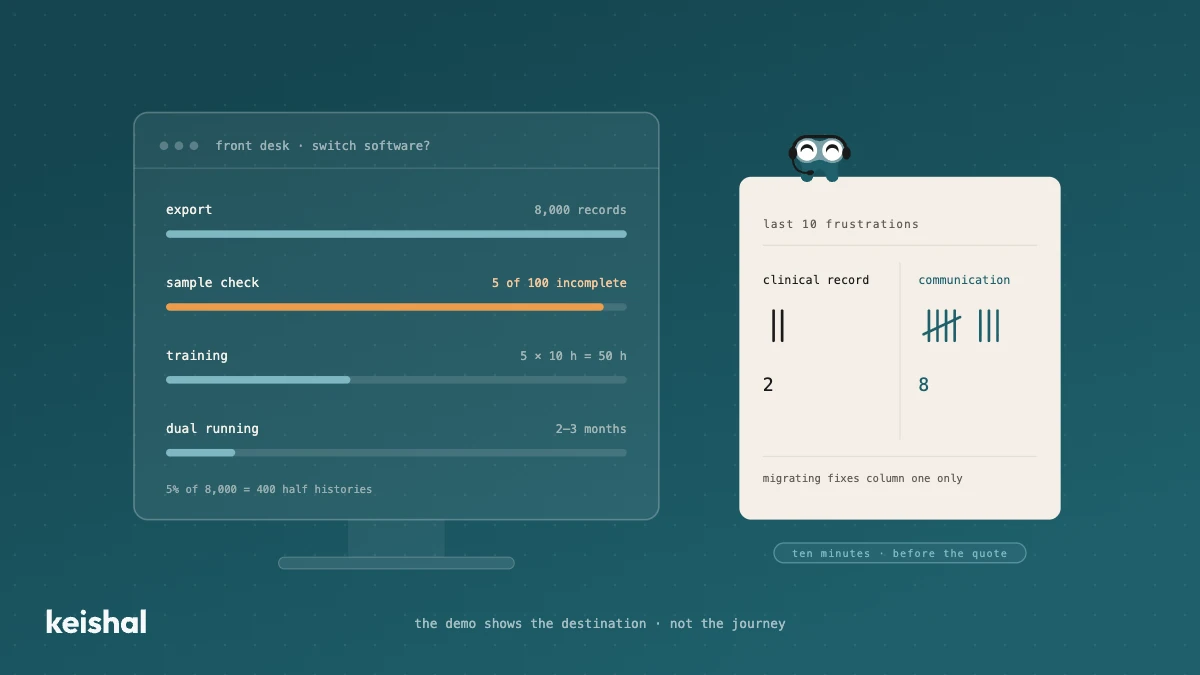
Switching dental software: what migrating really involves and when you don't need to
Switching dental software isn't installing a program: it's exporting and verifying thousands of records, training the team (5 people × 10 hours = 50 hours) and running two systems side by side for two or three months. It's worth it when the software has no support, holds your data hostage or the clinic has outgrown it. But if what's pushing you is unmanaged reminders, recall that never happens and out-of-hours messages, that communication layer can be added on top of your current PMS, without migrating anything.
How much does a dental clinic make in its first year: the curve, not the number
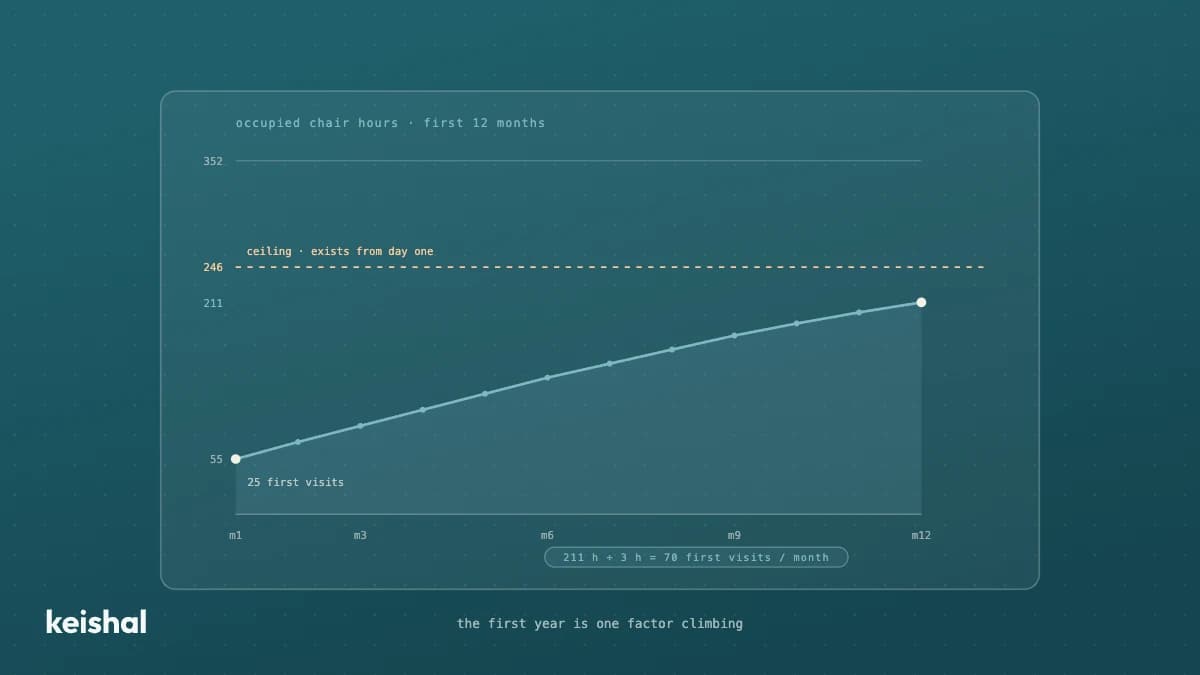
No published first-year average is defensible: they mix clinics, models and cities, and almost never show where the figure comes from. The useful answer is a curve you calculate with your own numbers. Your structural ceiling (chairs × available hours × € per occupied hour) exists from day one; what sits at zero is occupancy. Example: for 60 % occupancy in month 12 with 2 chairs (352 available hours) you need around 211 occupied hours a month; if each new patient generates around 3 chair hours, that is around 70 first visits a month. That division — the hours you want to fill divided by the hours each new patient brings — is your first year, and in 2026 there is still no report that does it for you.