
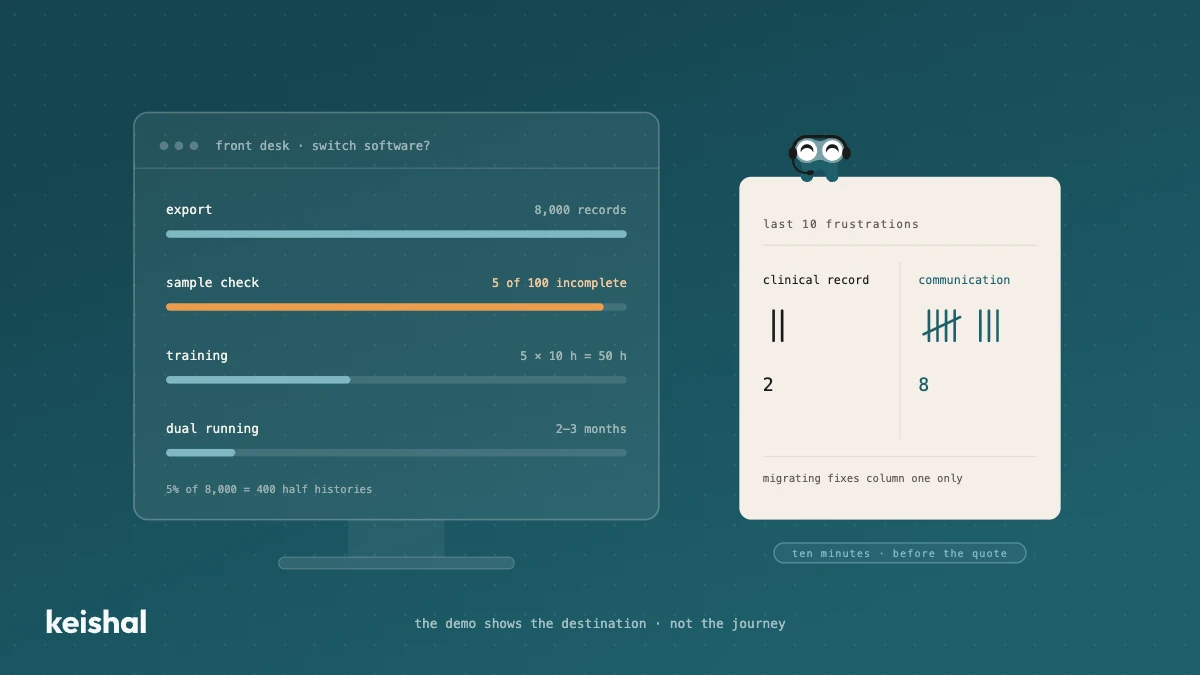
Switching dental software isn't installing a program: it's exporting and verifying thousands of records, training the team (5 people × 10 hours = 50 hours) and running two systems side by side for two or three months. It's worth it when the software has no support, holds your data hostage or the clinic has outgrown it. But if what's pushing you is unmanaged reminders, recall that never happens and out-of-hours messages, that communication layer can be added on top of your current PMS, without migrating anything.
The demo of the new software lasts an hour and shows you the destination: clean screens, a cloud schedule, everything in its place. What it doesn't show is the journey. Switching dental software means exporting and verifying thousands of patient records, training the whole team — 5 people × 10 hours = 50 hours nobody has in the schedule — and running two systems side by side for two or three months. This guide covers what migrating really involves, when it's worth taking on, and when the problem pushing you to switch can be solved without migrating anything.
What migrating really involves
The new software's licence is the visible part of the budget, and almost never the biggest. As we covered when we looked at what dental clinic software really costs, the real cost of a tool is who operates it and what it takes to get it running. In a migration, that cost concentrates in four jobs the demo never shows.
1. Exporting the data from the old system
Your patient database is the clinic's most valuable asset, and the old software stores it in its own format: contact details, treatment histories, dental charts, images, treatment plans, consents, internal notes. A standard export usually handles contact data and the appointment history well, and everything else worse. The usual weak points: X-rays and images in proprietary formats, treatment histories flattened into plain text, and custom fields the new software has nowhere to store.
Nobody can promise you a lossless migration without having seen your data. The most reasonable request in the whole process, and the one most sales reps dodge: a test export before you sign.
2. Verifying that what migrated is true
The migration isn't finished when the data is "in" — it's finished when someone checks it's in correctly. You don't need to review everything: a sample gives you the measure. 100 random records × 3 minutes = 5 hours of work, and with that you know what share arrived incomplete. If 5 records out of 100 fail in the sample, on a base of 8,000 patients that same 5% is 400 records with half a history. Running that check before you cancel the old software is the difference between a problem you detected and a problem you discover chairside.
3. Training the team
You change the software once; the team uses it every day. The training arithmetic is simple and rarely appears in the quote: 5 people × 10 hours = 50 hours, spread across schedules that are already full. And the training hours are the short part. For the first few weeks everything takes twice as long, because every gesture that used to be automatic becomes a decision again. The objection we hear most in sales conversations isn't the price: it's "last time it took us months and nobody used it".
4. The months of dual running
No switch happens overnight. For a while, the old system stays around for look-ups — the history that didn't migrate cleanly still lives there — while the new one becomes the working system. Two schedules to reconcile, appointments double-checked, a team asking "where do I find this now?". In practice: two or three months in which part of the team does double work. If the migration quote doesn't say how long this period lasts or who absorbs that work, it's incomplete.
When switching dental software makes sense
None of the above means "never switch". There are clear cases where migrating is worth it, and they deserve to be said just as clearly:
- Your software no longer gets support or updates. Working on an abandoned system means accumulating risk: every year that passes, the exit gets more expensive and more urgent.
- You need remote access and your software can't give it. Working the schedule from home, checking a case from another location. (If your question is desktop versus cloud within your own software, that's a different and smaller decision: we've covered it separately.)
- Your data is being held hostage. If you can't export your own database in a readable format today, you have a problem that grows over time. And a lesson for the next system: check the export before signing, not after.
- The clinic has grown and the software hasn't. Several locations, role-based permissions, a volume the system can't handle: those are structural limits, not quirks.
If you're in one of these cases, switch with criteria: compare the options with a neutral guide and take the five questions below with you. Switching for the sake of switching, on the other hand, is not a strategy.
When you don't need to: the diagnosis before the quote
Before requesting quotes, do a ten-minute exercise: write down your last ten frustrations with your current software and split them into two columns.
The first column holds what belongs to the clinical record: the dental chart falls short, treatment plans come out wrong, the history is awkward to consult, the software crashes. If your frustrations live here, your problem is the PMS, and the previous section is for you.
The second column holds what belongs to communication: reminders that go out but nobody handles the replies, the recall that was planned and never happens, the messages that arrive on a Tuesday at 9 pm and get answered on Thursday. Run the numbers on your own schedule: 15 appointments a day × 22 working days = 330 reminders a month, and if 1 in 10 gets a reply, that's 33 conversations someone has to handle. With 50 opening hours a week, 118 of the week's 168 hours — 70% — pass with the clinic closed.
In sales conversations, most clinics that want to leave their software have a list full of the second column. And that's the trap: the new software brings another clinical record, another dental chart and another schedule, but the communication layer will keep depending on the same thing it does today — on whoever has time to operate it. Migrating doesn't fix that list: it changes your clinical record, which wasn't what was failing.
That layer is a separate decision from the PMS one and doesn't require migrating anything: it connects on top of the software you already have, reads its schedule and writes the outcomes back into it. It's no coincidence that dental software vendors themselves presented patient-communication modules at Expodental 2026: the gap is exactly there. If what you're circling is a CRM, the same question — who operates it — decides. And if what you're thinking of leaving isn't the PMS but a communication tool you pay for and nobody uses, we've written that case too.
"We requested quotes to switch software twice in three years, and both times we stopped out of fear of losing the histories. In the end we realised the clinical record was never the problem: what was burning us was that nobody could answer the WhatsApp in the afternoons."
— Summary of 2026 sales conversations with clinics considering a switch (composite quote, not verbatim)
The five questions before signing the switch
If after the diagnosis you conclude you do need to migrate, these five questions separate a serious quote from a pretty demo:
- Who exports my data, and in what format? Ask for a test export before signing and review a sample of records. It's an afternoon of work that can save you a bad quarter.
- What exactly gets lost along the way? Images, histories, custom fields: ask for the list in writing. A "nothing gets lost" said without having seen your data is a warning sign.
- How long does dual running last, and who does the double work? A number and a name. If they're missing, your team will pay that cost without anyone having budgeted it.
- How many training hours does my team need, and who delivers them? Do the arithmetic yourself — people × hours — and put it in the budget, because the vendor won't.
- What happens to the problem that made me look for alternatives? The question that saves entire migrations. If the honest answer is that the new software doesn't solve it either — because your problem sits in the communication column — you'll have migrated for nothing.
The layer you add without migrating anything
For the second column there's an option that never appears in migration quotes: an autonomous system that operates patient communication on top of the software you already have. It doesn't replace your PMS and doesn't touch your clinical record. It connects with systems like Gesden, Nubimed, Dentalink or Clinic Cloud and operates the layer the clinic never gets to: it sends the reminders and handles the replies, runs the recall that was planned, answers the questions that arrive out of hours and escalates to your team the ones that need a person. When a patient wants an appointment, it chats with them over WhatsApp and sends a calendar link where the patient picks the time themselves. Every outcome — the appointment, the confirmation, the status change — is written into the software you already use.
The difference with installing "another software" is who operates it: your team doesn't learn any new tool and doesn't open any dashboard. They see the results in the system they already know. For a clinic that has been postponing a migration for years out of fear of losing data, this is the counterintuitive part: the layer that was missing doesn't require touching the data.
And to be honest in the other direction: if your problem belongs to the first column — the clinical record, the dental chart, the structural limits — an autonomous system won't fix it. That's the migration from the first part of this guide, five questions included.
If you want to see it with your own numbers — your schedule, your database, your software — book a demo and we'll show you on your case, not a catalogue one.

Ready to try Keishal in your dental clinic?
Book a demo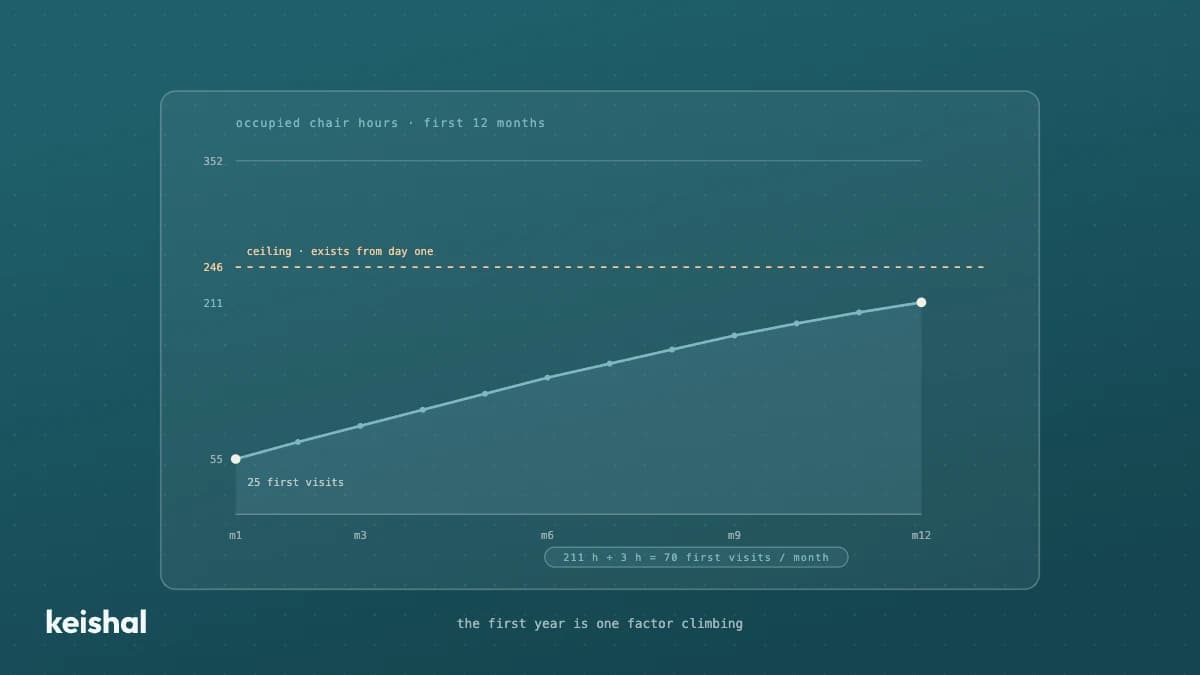
How much does a dental clinic make in its first year: the curve, not the number
No published first-year average is defensible: they mix clinics, models and cities, and almost never show where the figure comes from. The useful answer is a curve you calculate with your own numbers. Your structural ceiling (chairs × available hours × € per occupied hour) exists from day one; what sits at zero is occupancy. Example: for 60 % occupancy in month 12 with 2 chairs (352 available hours) you need around 211 occupied hours a month; if each new patient generates around 3 chair hours, that is around 70 first visits a month. That division — the hours you want to fill divided by the hours each new patient brings — is your first year, and in 2026 there is still no report that does it for you.
Google Business Profile for dental clinics: how to optimize it and what it will not fix
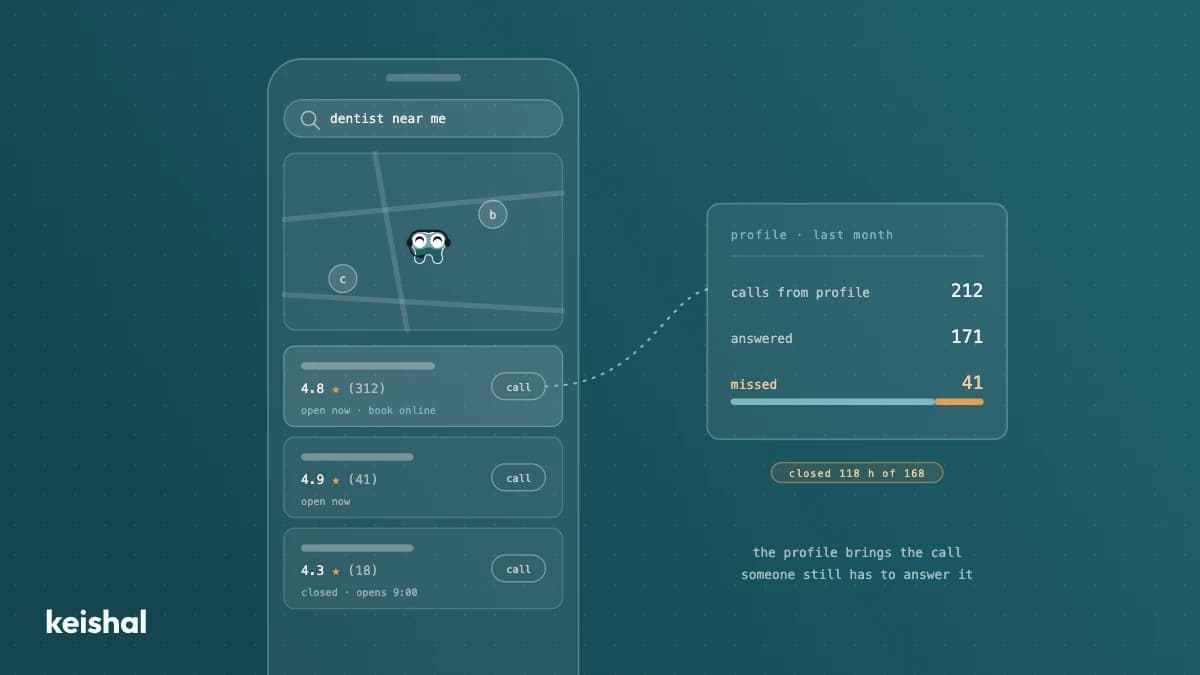
Your Google Business Profile is your dental clinic's real front page: many patients decide and call from there without ever visiting your website. Tuning it up is one afternoon of work and needs no agency: the right category and services, real hours including holidays, your own photos, a booking link and a constant flow of reviews. What the profile won't fix is what happens to the contacts it generates: with 50 open hours out of the week's 168, 118 go uncovered (70%). If the call lands there, the profile has only optimised your volume of missed calls.