Cookies & privacy
We use essential cookies to run the site and, with your consent, analytics cookies to understand how it's used. You can change your choice anytime.
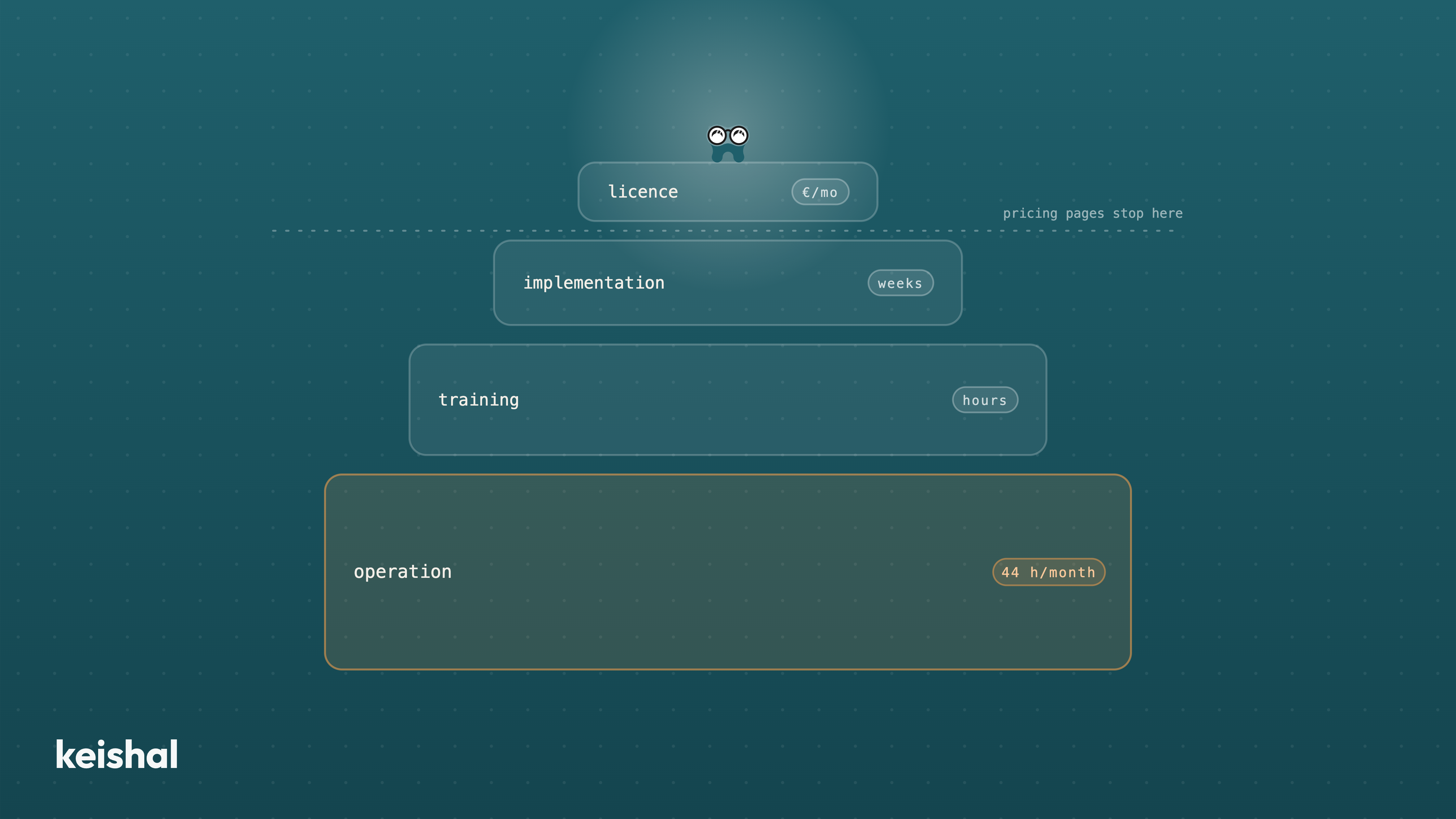
The licence price is only one of the four cost layers of dental clinic software: licence, implementation, training and operation. The most expensive one appears on no price list: just confirming the schedule by hand is 40 calls × 3 minutes = 2 hours a day, and one reactivation campaign of 1,000 dormant patients ≈ 83 hours. Before comparing prices, work out who will put in those hours: a licence nobody operates costs the same and returns nothing.
If you're searching for how much dental clinic software costs, you probably have several pricing pages open already. They all answer the same question: what the licence costs. None of them answers the one that actually decides: what it will cost you to use it.
The difference is not a nuance. Just confirming the schedule by hand, 40 calls at 3 minutes each, is 2 hours a day of someone's time on your team. That layer, the hours, appears on no price list. And it is usually the most expensive one.
In this article we break down the four cost layers of any dental software in 2026, with the arithmetic in plain sight so you can run it on your own clinic. You won't find other vendors' figures here: their prices change with modules, chairs and users, and they publish them on their own websites. What nobody publishes is the rest.
The licence is the easy part. It is public, it is comparable, and it comes in a table: so many euros per month depending on chairs, users or modules. That is why every price comparison stops here.
The problem is not the figure, it is the illusion that the figure is the cost. Comparing two software products by their licence is like comparing two treatments by the price of the materials: almost everything is missing.
The licence is the easiest layer to compare and the least decisive of the four. If you are still choosing, we keep a dental software comparison for Spain that sells no PMS and helps you shortlist before you look at price lists.
Between signing and having the software running there is a stretch that almost never appears in the proposal: migrating data, configuring the schedule, connecting integrations, deciding permissions.
Part of that work is done by the vendor. Another part you put in without noticing: kick-off meetings, configuration decisions, checking the migrated patients are correct. Those are your hours and your team's hours, and they count as cost even though nobody invoices them.
The useful question here is not "how much does implementation cost?" but "how many weeks does it take and how many hours of my team does it need?". If the answer is "it depends", ask for the typical case of a clinic your size.
On a sales call in May 2026, the owner of a family clinic in the Valencia region summed this layer up better than any table (we've left the tool unnamed):
"I tried it, but I never even got to use it. They set me up, they explained everything, and it needed many hours of training. At the time I didn't have them." (translated from the Spanish original)
Training is paid in hours, and in the hours of the person with the fewest free ones: your front desk. It is also not paid once. Every new hire goes through it again, so a front desk with staff turnover pays this layer every year.
Note the detail in the quote: the licence was paid and the training explained. What was missing wasn't money. It was time.
Here is the cost no pricing page shows, because it isn't the vendor's: it's yours. Patient-communication software has to be operated every day. Someone has to build the lists, launch the campaigns, answer the messages that come in, log the outcomes and keep the database clean.
Let's run the numbers on concrete tasks:
Not every clinic has 1,000 dormant patients: count yours and multiply. The figure will change; the conclusion rarely does. Those hours don't exist spare at a normal front desk, whose day is already full with in-person patients and the phone.
That is why so many purchased tools end up half-used. It isn't that the team is slow or the software is bad: the operation doesn't fit in the available hours. Who puts in those hours is the structural difference between software and an autonomous system, and it is the first question to ask before looking at any price.
When layer 4 doesn't fit, the outcome has a name. A dental clinic in Catalonia wrote it to us over WhatsApp, also in May 2026 (tool anonymised):
"We have it under contract but we do nothing with it. We don't even know how to use it." (translated from the Spanish original)
The arithmetic of this case is the simplest in the article: twelve paid instalments × zero use = the full cost of the licence, with zero value. The most expensive software is not the one with the highest fee. It is the one you pay for and don't use.
If this has happened to you, it is not your failing. It is a model that takes for granted hours a normal clinic's front desk doesn't have. We've analysed this pattern, the contracted tool nobody gets to operate, in depth, because it is what we hear most often in sales conversations.
Here we should be honest in both directions, because there are clinics where the self-operated licence is the right purchase.
If your front desk has real spare capacity every week, if there is a specific person who enjoys running tools, and if your protocols are stable, software your team operates is the most economical option. You pay the licence, you put in the hours, and you already had the hours.
The same goes if your clinic is small and your database short: with 300 dormant patients instead of 1,000, the campaign is 25 hours, not 83, and it can fit into a quiet month.
Saying this plainly costs us little and saves you a wrong purchase. The mistake is not choosing software or an autonomous system: it is choosing without having counted the hours.
Before signing any proposal, ask for concrete answers to these five questions. Vague answers are information too.
Keishal is an autonomous system: it integrates with the PMS you already have and our team operates it for you. Using this article's breakdown, the four layers look like this: we do the implementation, training disappears because your team has nothing to learn, and the operation, the expensive layer, runs on our side. Your team only sees the results in the schedule.
The price depends on the size of your database and on what you need operated, so publishing a single figure would tell you nothing useful. What we do see as a pattern across the clinics we operate: it typically pays for itself within the first month, with revenue movement several times above the cost. We don't publish that as a promise, because it depends on your database, not on us.
If you want the calculation with your own numbers — how many dormant patients you have, how many hours operating them would take, and what Keishal would do with them — book a demo and we'll build it on your own database.
A virtual receptionist should not replace your receptionist: it should absorb the repetitive load that does not fit in their day. A front desk open 50 hours a week leaves 118 of the week's 168 hours unanswered: 70% of the time. An autonomous system covers reminders that get a response, 24/7 booking (WhatsApp chat plus a calendar link), out-of-hours questions with escalation, recall and reactivation. It does not answer the phone: it removes volume from it. The front desk, clinical conversations and complaints stay human.
When you go from one clinic to two or three, the bottleneck stops being the schedule and becomes visibility: the location where you are not is a black box. To manage it without being there, compare locations with four ratios computed the same way everywhere — occupancy (370 out of 528 hours = 70%), no-shows over total appointments, dormant base over total database and contactability — and distrust any comparison made with unequal data quality. Total revenue compares sizes; ratios compare management.