
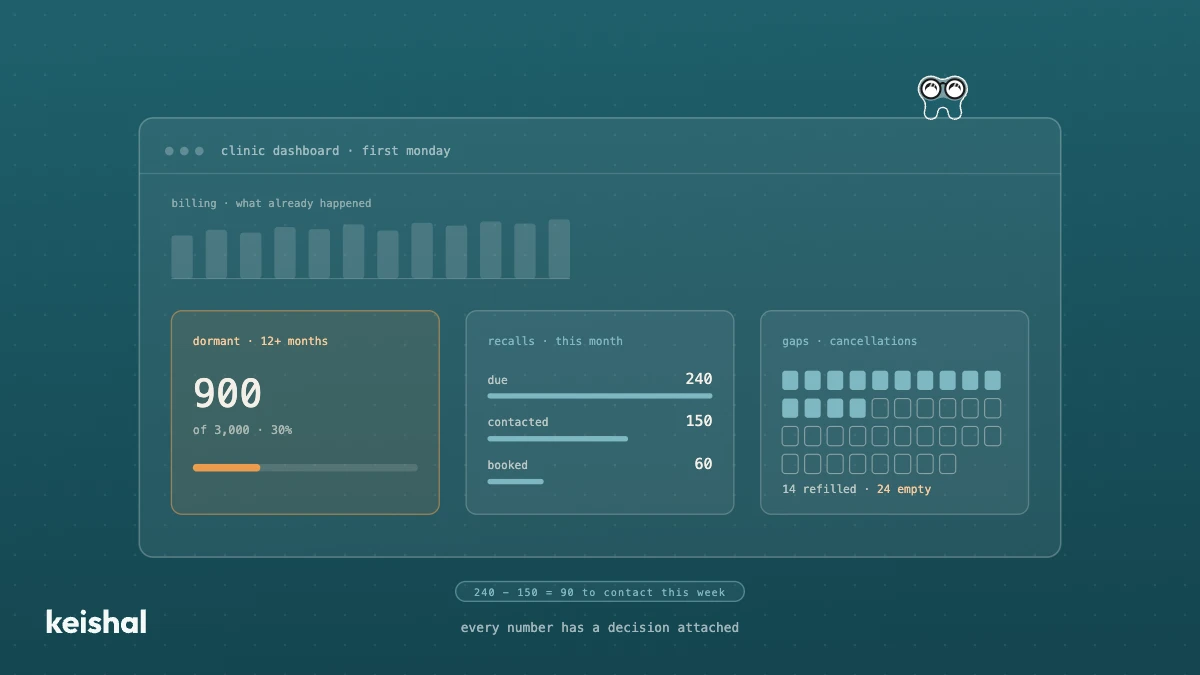
A dental clinic dashboard is useful if it helps you decide something. The one in your practice management software usually shows billing and the schedule, which is the past. What it usually lacks is the patient base: how many haven't been in for over a year (900 of 3,000 = 30%), which recalls fall due this month, which gaps stayed empty and how much of your base you can actually reach. Six questions, each with its number and its decision.
A dashboard for a dental clinic is only useful if it helps you decide something on Monday morning. Most clinics already have one: the one built into their practice management software. It usually shows billing, production and the schedule, which is what has already happened. What it almost never shows is your patient base: how many haven't been in for over a year, which recalls are pending, or how many gaps were left empty.
That's the part that fills chairs. If you have 3,000 patients and 900 haven't visited in more than twelve months, that 30% of your base doesn't appear on any billing chart. And it's exactly where the demand you can still recover sits.
This article covers what a dental clinic dashboard should show you, where each number comes from, what decision it triggers, and when the one in your software or a spreadsheet is enough.
What a dental clinic dashboard is
A dashboard is a single screen with a few numbers, reviewed the same way at a regular interval. It isn't a long report or a list of every piece of data you have. Its job is to answer a handful of questions and tell you where to look.
The difference from a list of indicators is the form. What to measure every month is covered in dental clinic KPIs. This article is about the tool: who looks at it, how often, where each figure comes from and what you do when a figure moves.
A good dashboard has three traits:
- Few numbers. Between five and eight. If there are thirty, nobody reads them.
- Fixed definitions. "Dormant patient" means the same this month as last month.
- Every number has a decision attached. If a figure goes up or down and you wouldn't do anything differently, it doesn't belong.
What your practice management software's dashboard usually shows
Dental practice management software does its core job well: schedule, clinical records, treatment plans and billing. Whether you use Gesden One, Nubimed or Dentalink, the software is your system of record, and you don't need to replace it to see more.
The dashboards in practice management software tend to focus on what the software itself records best. Monthly billing, production per clinician, completed appointments, schedule occupancy or treatment plans issued. Check exactly what yours shows, because it varies by product and version.
All of those numbers have one thing in common: they describe the past. They tell you what you billed in September, but not how many patients should have come back in September and didn't. What's usually missing is the patient base seen as something live:
- How many patients are dormant and what's being done about them.
- Which recalls fall due this month and how many have actually been contacted.
- How many cancellations were refilled and how many stayed empty.
- What share of your base has a phone number that works.
That isn't a flaw in the software. A practice management system records what happens inside the clinic. The dormant base is, by definition, what doesn't happen: the patients who don't call.
The six questions your dental clinic dashboard should answer
Each question comes with its number, where it comes from and the decision it triggers. The examples use a clinic with 3,000 patients. Replace the figures with yours.
1. How many patients do I have to win back?
The number: patients with no visit in more than twelve months, divided by the total. With 900 out of 3,000, that's 30%.
Where it comes from: the last-visit date in your practice management software. It's a filter, not an estimate.
What it decides: if the percentage rises month after month, recall is failing at the front door. To size it, multiply by your average treatment value: 900 × €110 = €99,000 of stalled treatment. Not all of them would come back even if you wrote to them, because some have moved or no longer need it. But it's the size of the opportunity, explained in more detail in how much your clinic loses to inactive patients.
2. What's happening with this month's pending recalls?
The number: three figures in a row. Patients due a check-up this month, how many have been contacted and how many have an appointment. For example, 240 due, 150 contacted and 60 booked.
Where it comes from: the schedule and the contact log. If contacts happen by phone and nobody logs them, this number doesn't exist.
What it decides: 240 − 150 = 90 patients nobody has contacted. That's a concrete task for this week, not a trend.
3. How many gaps were left empty?
The number: cancellations this month and how many were filled again. With 38 cancellations and 14 rebooked, 24 gaps stayed empty.
Where it comes from: the schedule, comparing cancelled appointments with appointments created in the same slot.
What it decides: 24 gaps × 45 minutes = 18 hours of unused chair time in a month. If the figure is high, you're missing a waiting list someone works the moment a cancellation comes in.
4. How much of my base can I actually reach?
The number: the share of records with a valid phone number. Check a sample of 100 records: if 12 have the wrong number, apply that 12% to the whole base. 3,000 × 12% = 360 unreachable patients.
Where it comes from: a manual sample or an automatic phone validation.
What it decides: this number caps all the others. A campaign that reaches 88% of the base can never perform like one that reaches 98%. That's why data quality at your dental clinic comes before any chart.
5. Which accepted treatments still have no appointment?
The number: treatment plans accepted in the last 90 days with no future appointment. For example, 11 out of 40.
Where it comes from: cross-checking accepted plans against the schedule. Almost no default report does this.
What it decides: 11 × €600 average value = €6,600 the patient already said they wanted. It's the easiest call of the month, because the patient has already said yes.
6. What will I bill next month?
The number: confirmed appointments for next month, minus your historical drop-off rate. 300 appointments with 12% drop-off: 300 × 0.88 = 264 appointments that will probably happen.
Where it comes from: the future schedule and your own cancellation history.
What it decides: if the forecast comes in below normal with three weeks to go, there's still time to push recall and reactivation. We cover it in revenue forecasting for your dental clinic.
If you can only add one question to what you already see, make it the first. The other five help you manage better. The first tells you how much business is sitting idle inside your own base.
Who looks at it, and how often
A dashboard everyone looks at all the time ends up as noise. It works better with three rhythms:
- The owner, once a month. The six questions, compared with the previous month. Fifteen minutes on the first Monday of the month.
- Whoever manages the clinic, every week. Pending recalls, empty gaps and treatments without an appointment. These are the numbers that turn into tasks.
- The front desk, every day. It doesn't need a dashboard, it needs a list: who to call today and which gap to fill.
If you have more than one location, the rule changes slightly: the same numbers, calculated the same way at each clinic, and never comparing total billing. We explain it in how to manage multiple dental clinics with the same KPIs.
Doing it by hand: a spreadsheet or a generic BI tool
Six numbers a month fit in a spreadsheet. For a single clinic, building the dashboard in Excel is a reasonable option if two conditions hold: someone at the clinic enjoys doing it, and the definitions don't change.
The time arithmetic is simple. Exporting data from the software, matching the schedule against treatment plans and checking the phone sample can take around 2 hours a month. 2 × 12 = 24 hours a year. For many clinics that's an acceptable price.
The problem with a spreadsheet usually isn't volume, it's definitions. If "dormant" means twelve months one month and eighteen the next, the trend means nothing. And if the person who built it leaves, the dashboard leaves with them.
A generic business intelligence tool solves the charts, but not where the data comes from. Someone has to connect it to the practice management software, keep that connection running and decide what counts as a dormant patient. It pays off when there are several locations and a person with time to maintain it. For a single clinic, it's almost always more tool than will get used.
What a dashboard doesn't fix
A dashboard doesn't fix anything. It tells you where to look. If pending recalls show 90 patients not contacted, someone still has to contact them. The number only saves you the step of finding out they were there.
It's also no better than the data it reads. With 12% broken phone numbers, every percentage that depends on reaching patients is calculated on a base you can't fully reach.
It's a pattern we hear often in conversations with clinic owners in 2026. A composite quote drawn from several of them sums it up: "I check billing every week. What I don't know is how many patients have drifted away without anyone noticing."
Does it work with my practice management software?
You don't need to switch software to get these numbers. The patient base, the schedule and the treatment plans are already in it. What's missing is someone or something that reads them with the same definitions every month and records what happens with each contact.
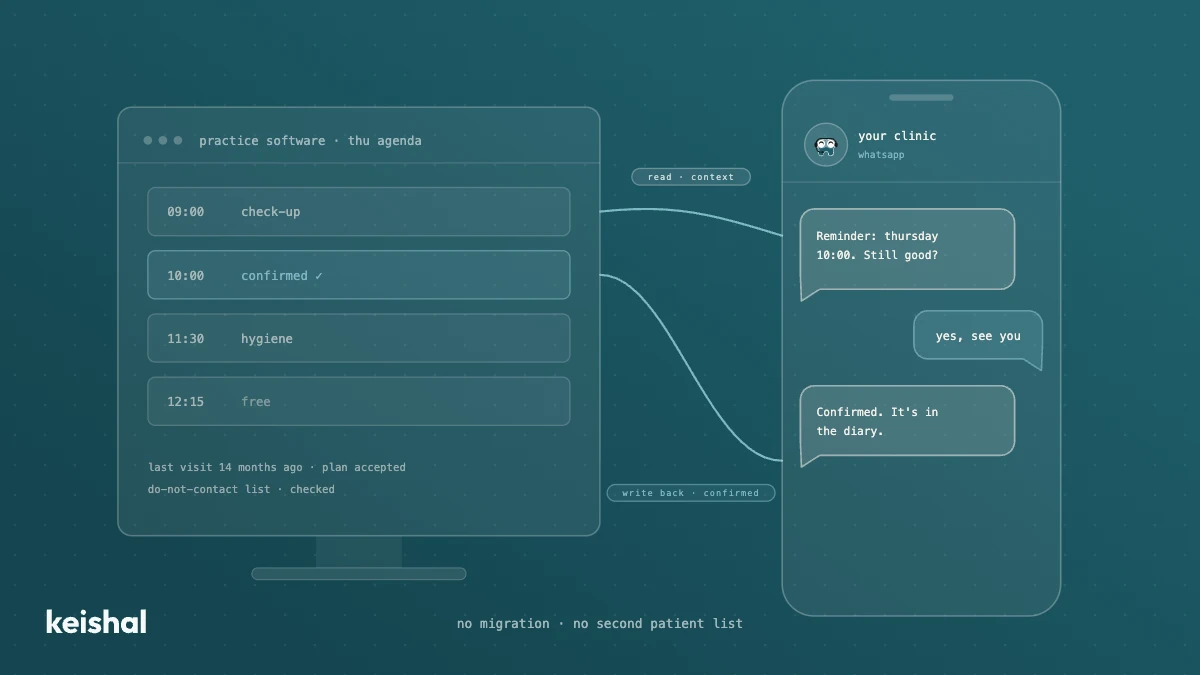
Keishal connects to the most common practice management software in Spain, including Gesden G5, Gesden One, Nubimed, Dentalink, Clinic Cloud, Flowww and Klinikare. It reads patient data for context and writes appointments and statuses back. There's no migration and no duplicate database. If your software isn't on the list, the connector layer is modular and you can ask us.
How Keishal handles it
Keishal is an autonomous system that operates the administrative side of the clinic: reminders, recall, dormant-patient reactivation and WhatsApp bookings. Because the system itself holds those conversations, the patient-base numbers come from real activity, not from a log someone has to remember to fill in.
On top of that activity, the business intelligence block does three things:
- Results analytics. Monthly or on-demand reports on what the system has produced: patients reactivated, appointments booked, revenue billed, response rates and conversion patterns. Built for the owner, not for IT.
- Forecasting. Uses your history and what's already in motion, such as open treatment plans and scheduled treatments, to forecast revenue, appointment volume and capacity for the coming months, as ranges.
- Data quality. Detects duplicate records, validates phone numbers and emails, fills in missing fields when patients reply on WhatsApp, and flags what it can't resolve for your team to review.
Your team doesn't configure anything or learn a new tool. They get the numbers and decide.
Questions that decide it
Before you build a dashboard or pay for one, ask yourself these questions:
- Does it tell me how many patients I have to win back and what's happening with them? If not, it shows the past and little else.
- Does every number have a written definition that doesn't change? If not, the trends aren't reliable.
- Where does each figure come from, and who updates it? If it depends on someone remembering, one month it will fail.
- How much of my base can I actually reach? If you don't know, every other percentage is inflated.
- Who acts when a number moves? A dashboard without an owner is just a chart.
If you can only ask one, ask the first. It's what separates a dashboard that tells you what already happened from one that tells you where this month's work is.
If you'd like to see these numbers calculated for a clinic your size, book a demo and we'll show you with real data.

Ready to try Keishal in your dental clinic?
Book a demo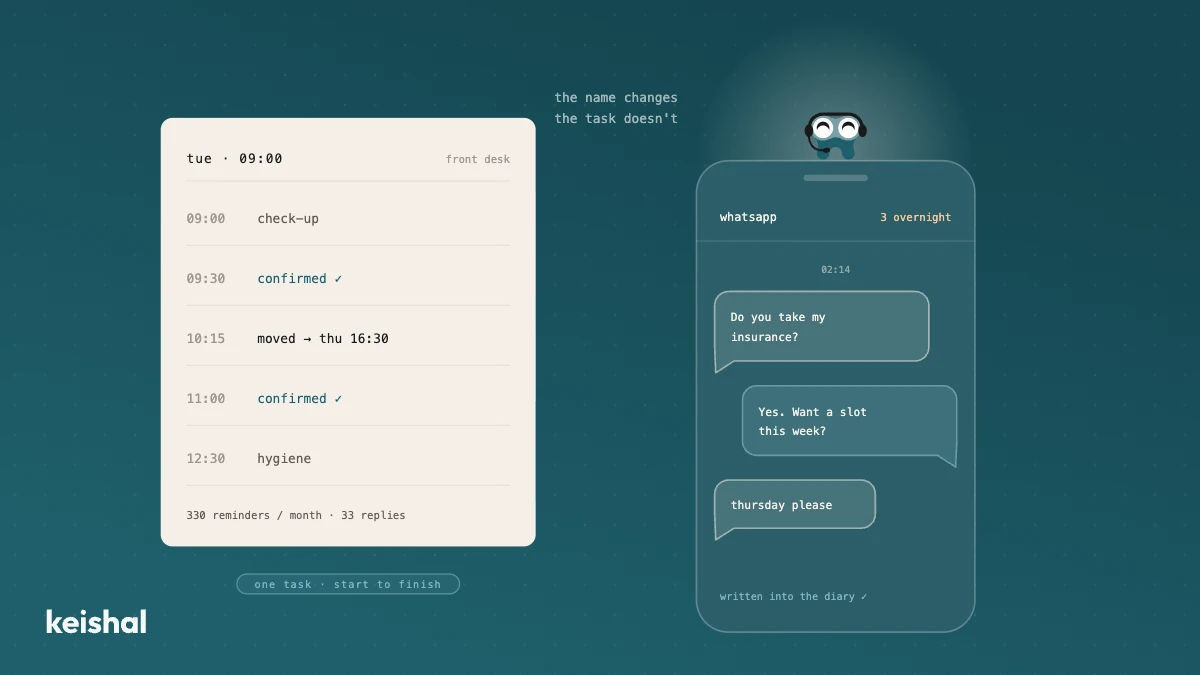
What is superintelligence and what AI actually does in a dental clinic today
Superintelligence is a hypothetical AI that would outperform people at almost every intellectual task, and it doesn't exist today. The AI dental clinics use is narrow AI: it confirms appointments (15 × 22 = 330 reminders a month), reactivates dormant patients, answers during the 118 hours a week the clinic is closed and flags incomplete records. For a clinic, the name matters less than the specific task the tool gets done in your schedule.
Integrating AI with your dental practice software: what a real connection means
A real integration with your dental clinic's software does two jobs: it reads your patients' data for context and writes appointments, confirmations and status changes back into your program. A monthly CSV, a calendar connector or a read-only tool leaves the rest to your team: with 330 reminders a month, marking each confirmation at 30 seconds adds up to almost 3 hours. Ask for the list of supported programs and versions in writing, and check that there's no migration and no duplicate patient base.